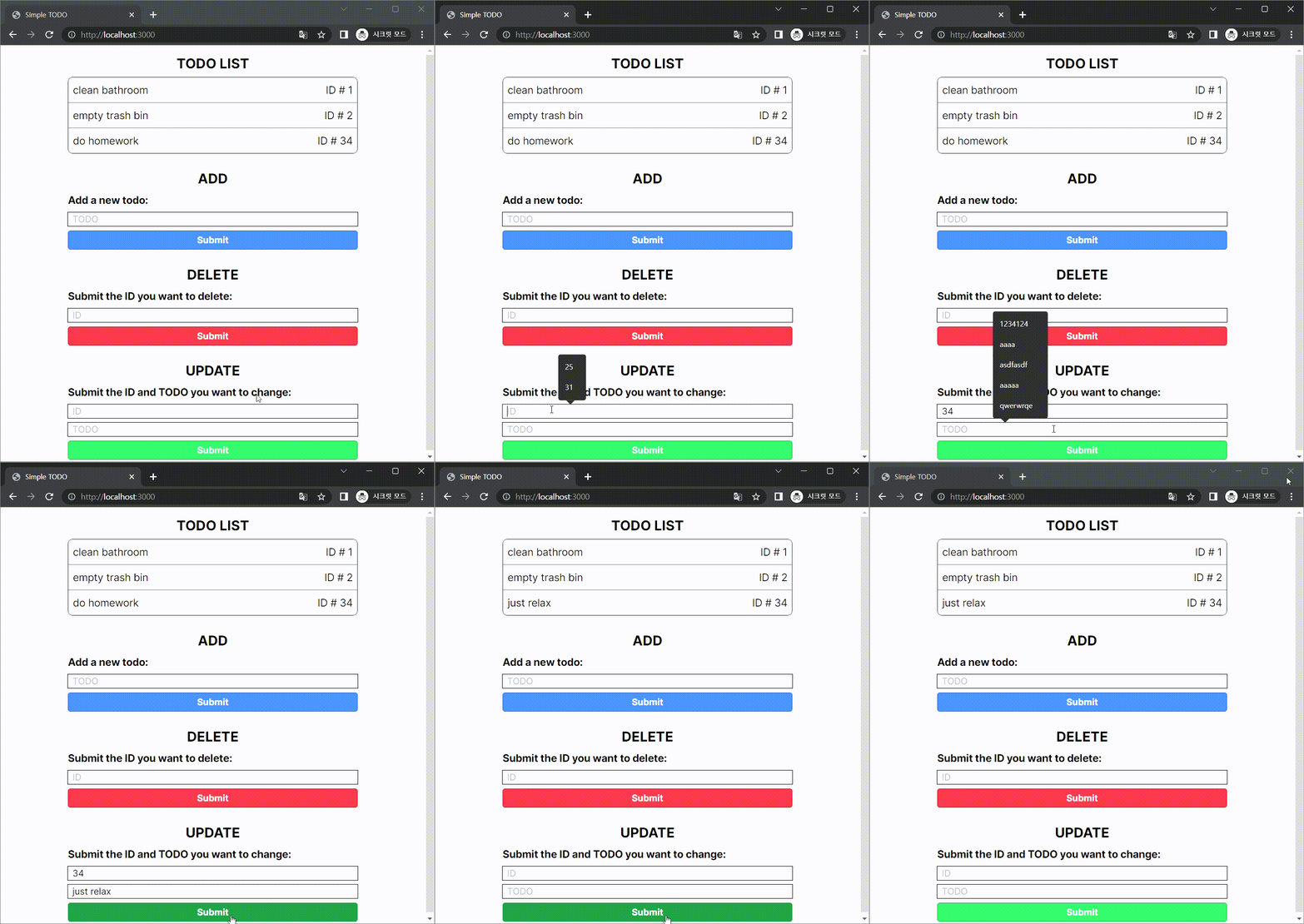
아래와 같은 결과물을 목표로 작업하였다.

구현 완료 후 최종 directory 구조는 아래와 같다.

# Backend
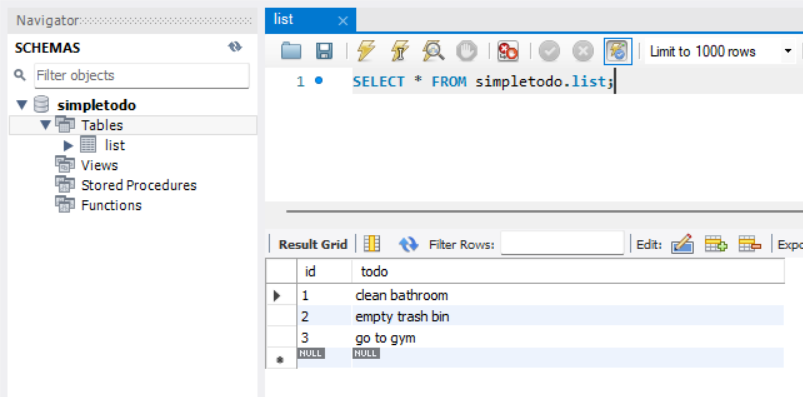
먼저 mysql로 schema와 table을 생성하고 샘플 데이터를 추가하였다.
이제 Next.js에서 해당 DB를 조회하고 수정하는 기능을 구현하여야 한다.
앞선 글에서 언급했듯이 Next.js의 route handler 기능을 사용할 것이므로 app/api/todoList/ 폴더를 생성하고 그 내부에 route.ts 파일을 생성하였다.
이 route.ts 파일에 각 HTTP method를 처리할 api를 구현하면 front 단에서 http://localhost:3000/api/todoList에 요청을 보낼 수 있다.
먼저 DB 접속을 위한 api를 구성하자.
app/api에 db.ts 파일을 생성하였다.
Connection pool을 이용하였고, pool에서 connection을 가져오는 'getConnection' api와 db에 sql을 보내 처리하기 위한 'query' api를 생성하였다.
// app/api/db.ts
import { PoolConnection, MysqlError } from "mysql";

const mysql = require("mysql");
const config = {
  host: process.env.DB_HOST,
  user: process.env.DB_USER,
  password: process.env.DB_PASSWORD,
  database: process.env.DB_SCHEMA,
};
const pool = mysql.createPool(config);

export function getConnection(): Promise<PoolConnection> {
  return new Promise((resolve, reject) => {
    pool.getConnection((error: MysqlError, connection: PoolConnection) => {
      if (error) return reject(error);
      return resolve(connection);
    });
  });
}

export function query(connection: PoolConnection, sql: string) {
  return new Promise((resolve, reject) => {
    connection.query(sql, (error: MysqlError, results: any) => {
      if (error) return reject(error);
      return resolve(results);
    });
  });
}
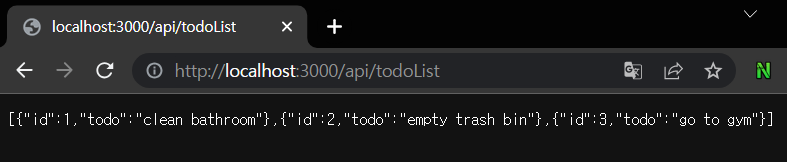
이제 read에 해당하는 GET method를 처리하기 위한 api를 작성하여 서버가 정상 동작하는지 확인한다.
정상 동작 시 브라우저에서 "http://localhost:3000/api/todoList"에 접속하면 앞서 추가한 샘플 데이터가 나타나야 한다.
// app/api/todoList/route.ts
import { getConnection, query } from "../db";

export async function GET() {
  const connection = await getConnection();
  const sql = "SELECT * FROM list";
  const result = await query(connection, sql);
  connection.release();
  return new Response(JSON.stringify(result));
}
잘 작동하는 것을 확인하였으니 POST, DELETE, PUT에 대응되는 api도 구현한다. 각각 create, delete, update에 대응된다.
// app/api/todoList/route.ts
export async function POST(req: Request) {
  const connection = await getConnection();
  const data = await req.json();
  const sql = `INSERT INTO list (todo) VALUES ("${data.todo}")`;
  const result = (await query(connection, sql)) as any;

  const message = result?.insertId ? "success" : "error";
  const todoInfo = { id: result?.insertId, todo: data.todo };
  return new Response(JSON.stringify({ message, todoInfo }));
}

export async function DELETE(req: Request) {
  const connection = await getConnection();
  const data = await req.json();
  const sql = `DELETE FROM list WHERE id = ("${data.id}")`;
  const result = (await query(connection, sql)) as any;

  const message = result?.affectedRows ? "success" : "error";
  const todoInfo = { id: result?.id };
  return new Response(JSON.stringify({ message, todoInfo }));
}

export async function PUT(req: Request) {
  const connection = await getConnection();
  const data = await req.json();
  const sql = `
    UPDATE list
    SET todo = "${data.todo}"
    WHERE id = ${data.id};
  `;
  const result = (await query(connection, sql)) as any;

  const message = result?.affectedRows ? "success" : "error";
  const todoInfo = { id: data.id, todo: data.todo };
  return new Response(JSON.stringify({ message, todoInfo }));
}
backend 끝!
# Frontend
app 폴더 내의 page.tsx에 위 사항을 구현하였다.
개발 시 상태 관리의 편의성을 위해 page.tsx에 한 번에 구현하였다.
CRUD 동작 수행 시 곧바로 페이지에 나타나는 TODO list가 수정되기를 원했으므로 client component를 사용하였다.
상태 관리는 TODO list 정보를 array에 담아 useState를 통해 관리하였으며,
create, update, delete 시 해당 array를 변경하여 페이지가 re-render 되고 view 단 list가 update 되도록 하였다.
전체적인 코드의 구조는 다음과 같다.
페이지 마운트 시 TODO list 정보를 fetch해오기 위해 useEffect를 사용하였다.
"use client"

import { useEffect, useRef, useState } from "react";

const API_URL = `${process.env.NEXT_PUBLIC_URL}/api/todoList`;

export default function Home() {
  const [list, setList] = useState<any[]>([]);

  async function getTodoList() {
    const response = await fetch(API_URL);
    const data = await response.json();
    setList(data);
  }

  // for inital loading
  useEffect(() => {
    getTodoList();
  }, []);

  // READ section
  ...

  // CREATE section
  ...

  // DELETE section
  ...

  // updateSection
  ...

  return (
    <div className="flex justify-center">
      <div className="m-2 space-y-4 divide-y-4 max-w-lg">
        {readSection}
        {createSection}
        {deleteSection}
        {updateSection}
      </div>
    </div>
  );
}
READ
TODO list의 정보를 unordered list 형태 표현하였으며 "todo"에 해당하는 string과 id가 출력되도록 하였다.
  // READ section
  const readSection = (
    <div className="space-y-2">
      <div className="mt-2 text-center font-bold text-2xl">TODO LIST</div>
      <div className="rounded-lg border border-gray-800">
        <ul role="list" className="divide-y divide-gray-500">
          {list.map((item: { id: number; todo: string }) => (
            <li
              key={item.id}
              className="flex p-2 justify-between gap-x-6 text-lg"
            >
              <span>{item.todo}</span>
              <span>ID # {item.id}</span>
            </li>
          ))}
        </ul>
      </div>
    </div>
  );
CREATE
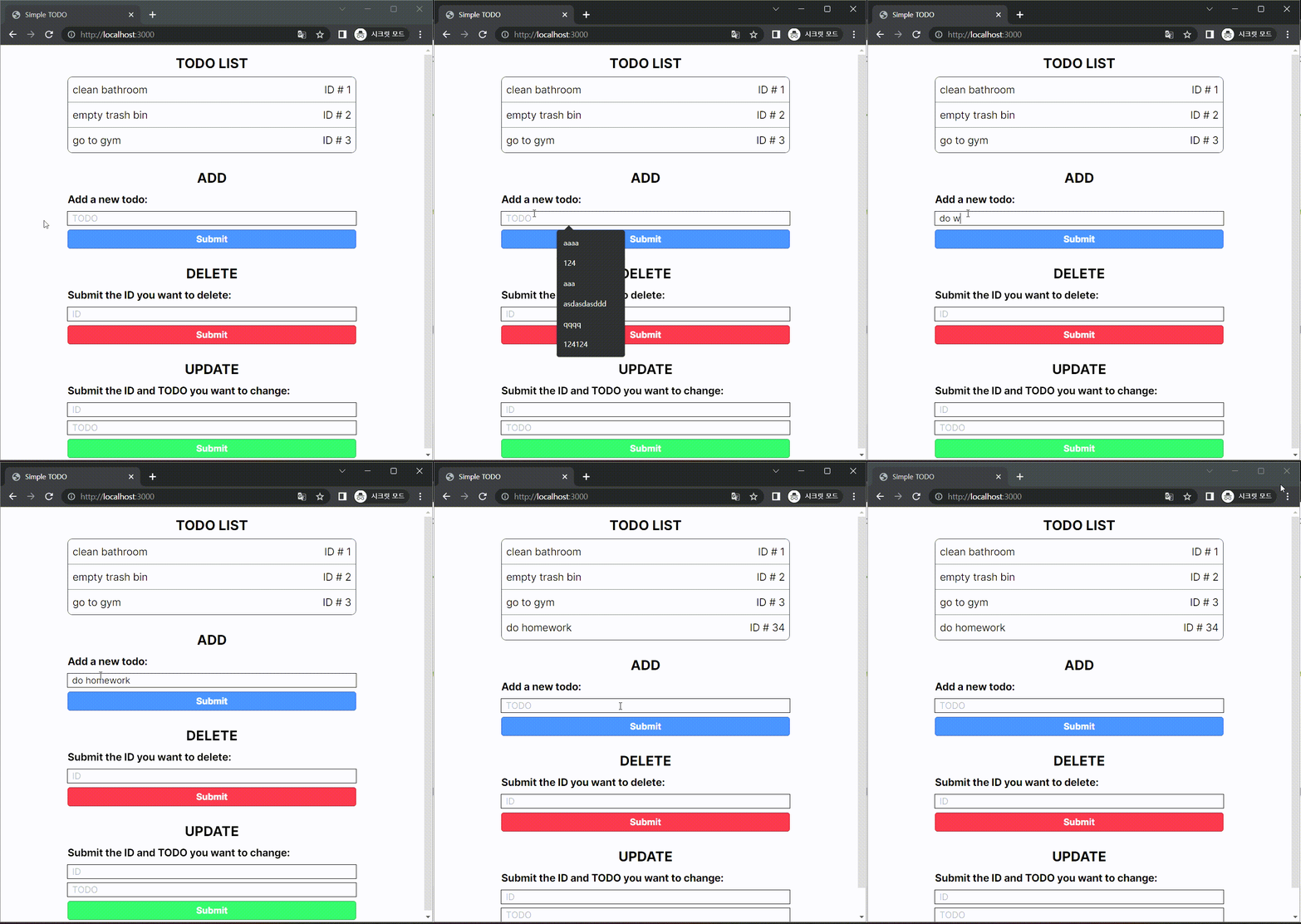
Input tag에 string을 입력하여 Submit 버튼을 누르면 TODO list에 추가되도록 하였다.
Input tag의 값을 re-render 없이 추적하기 위해 useRef를 사용하였으며 input tag 값을 ref에 update하기 위한 'handleAddChange' function과 submit 시 요청 처리를 위한 'addItem' function을 작성하였다.
  // CREATE section
  const addRef = useRef("");
  const handleAddChange = (e: React.FormEvent<HTMLInputElement>) => {
    addRef.current = e.currentTarget.value;
  };
  const addItem = async (e: React.FormEvent<HTMLFormElement>) => {
    e.preventDefault(); // prevent refreshing
    const init = {
      method: "POST",
      body: JSON.stringify({ todo: addRef.current }),
    };
    const response = await (await fetch(API_URL, init)).json();
    if (response.message === "success") {
      const info = response.todoInfo;
      setList([...list, { id: info.id, todo: info.todo }]);
    }
    (e.target as HTMLFormElement).reset();
  };
  const createSection = (
    <div className="space-y-2">
      <div className="mt-2 text-center font-bold text-2xl">ADD</div>
      <form className="space-y-2" onSubmit={addItem}>
        <label htmlFor="create" className="font-bold text-lg">
          Add a new todo:
        </label>
        <br />
        <input
          className="outline outline-1 w-full indent-2"
          type="text"
          id="create"
          placeholder="TODO"
          onChange={handleAddChange}
        ></input>
        <button
          className="bg-blue-500 hover:bg-blue-700 text-white font-bold px-3 py-1 border border-blue-700 rounded w-full"
          type="submit"
        >
          Submit
        </button>
      </form>
    </div>
  );
DELETE
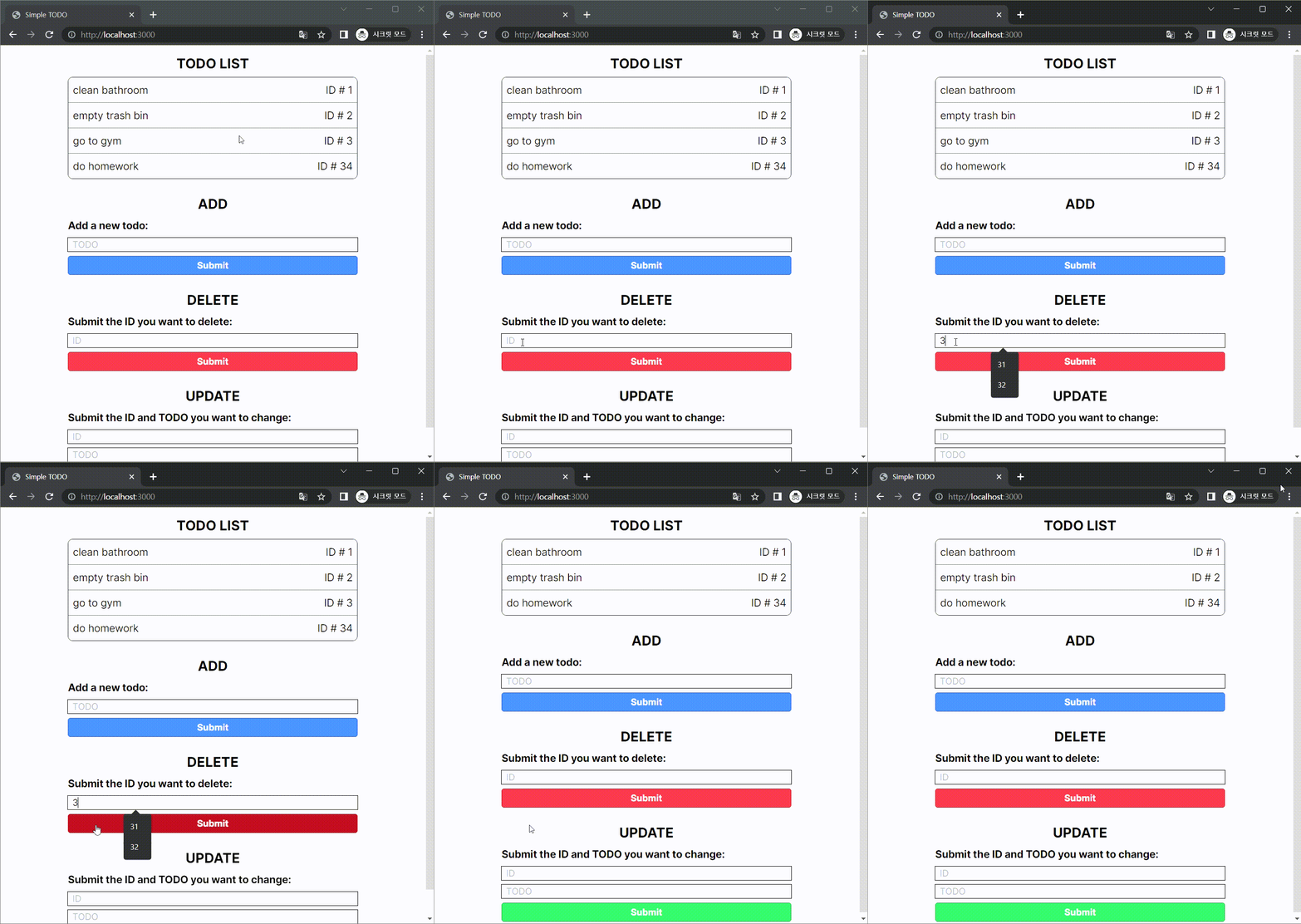
코드 구조 자체는 ADD와 동일하다.
  // DELETE Section
  const deleteRef = useRef("");
  const handleDeleteChange = (e: React.FormEvent<HTMLInputElement>) => {
    deleteRef.current = e.currentTarget.value;
  };
  const deleteItem = async (e: React.FormEvent<HTMLFormElement>) => {
    e.preventDefault(); // prevent refreshing
    const deleteId = Number(deleteRef.current);
    if (!Number.isFinite(deleteId)) return;
    const init = {
      method: "DELETE",
      body: JSON.stringify({ id: deleteId }),
    };
    const response = await (await fetch(API_URL, init)).json();
    if (response.message === "success") {
      let newList = [...list];
      for (let i = 0; i < newList.length; i += 1) {
        if (list[i].id === deleteId) {
          newList.splice(i, 1);
          break;
        }
      }
      setList(newList);
    }
    (e.target as HTMLFormElement).reset();
  };
  const deleteSection = (
    <div className="space-y-2">
      <div className="mt-2 text-center font-bold text-2xl">DELETE</div>
      <form className="space-y-2" onSubmit={deleteItem}>
        <label htmlFor="create" className="font-bold text-lg">
          Submit the ID you want to delete:
        </label>
        <br />
        <input
          className="outline outline-1 w-full indent-2"
          type="text"
          id="dekete"
          placeholder="ID"
          onChange={handleDeleteChange}
        ></input>
        <button className="bg-red-500 hover:bg-red-700 text-white font-bold px-3 py-1 border border-red-700 rounded w-full">
          Submit
        </button>
      </form>
    </div>
  );
UPDATE
Input tag가 두 개여서 코드가 조금 더 긴 점을 제외하면 역시 구조는 동일하다.
  // UPDATE Section
  const updateIdRef = useRef("");
  const updateTodoRef = useRef("");
  const handleUpdateIdChange = (e: React.FormEvent<HTMLInputElement>) => {
    updateIdRef.current = e.currentTarget.value;
  };
  const handleUpdateTodoChange = (e: React.FormEvent<HTMLInputElement>) => {
    updateTodoRef.current = e.currentTarget.value;
  };
  const updateItem = async (e: React.FormEvent<HTMLFormElement>) => {
    e.preventDefault(); // prevent refreshing
    const updateId = Number(updateIdRef.current);
    const updateTodo = updateTodoRef.current;
    if (!Number.isFinite(updateId)) return;
    const init = {
      method: "PUT",
      body: JSON.stringify({ id: updateId, todo: updateTodo }),
    };
    const response = await (
      await fetch("http://localhost:3000/api/todoList", init)
    ).json();
    if (response.message === "success") {
      let newList = [...list];
      for (let i = 0; i < newList.length; i += 1) {
        if (list[i].id === updateId) {
          newList.splice(i, 1, { id: updateId, todo: updateTodo });
          break;
        }
      }
      setList(newList);
    }
    (e.target as HTMLFormElement).reset();
  };
  const updateSection = (
    <div className="space-y-2">
      <div className="mt-2 text-center font-bold text-2xl">UPDATE</div>
      <form className="space-y-2" onSubmit={updateItem}>
        <label htmlFor="update_id" className="font-bold text-lg">
          Submit the ID and TODO you want to change:
        </label>
        <input
          className="outline outline-1 w-full indent-2"
          type="text"
          id="update_id"
          placeholder="ID"
          onChange={handleUpdateIdChange}
        ></input>
        <input
          className="outline outline-1 w-full indent-2"
          type="text"
          id="update_todo"
          placeholder="TODO"
          onChange={handleUpdateTodoChange}
        ></input>
        <button className="bg-green-500 hover:bg-green-700 text-white font-bold px-3 py-1 border border-green-700 rounded w-full">
          Submit
        </button>
      </form>
    </div>
  );
Frontend 끝!
# 후기
최종적으론 하나의 page.tsx로 구현을 했지만, 구현 과정을 경험해보니 폴더 기반 routing이 굉장히 편리하며 왜 이 프레임워크가 많이 사용되는지 알 것 같다.
다만 새로 도입된 server component는 사용자 요청에 즉각적으로 반응해 컨텐츠를 변경해야 하는 웹 앱을 만들기에는 조금 불편할 수도 있겠다.
적어도 페이지 내 여러 컴포넌트에서 "use client"를 선언하는 일이 굉장히 많아질 것 같다.
그리고 이번에 겸사겸사 CSS framework를 처음 사용해봤는데, 굉장히 편리하긴 하지만 각 클래스 네임에 익숙해지는데 시간이 조금 필요하다.
현재는 간단히 테스트하기 위한 용도여서 모든 적용할 스타일을 클래스 네임에 때려박아넣었고, 이 때문에 굉장히 더러워보인다.
실제 프로젝트 적용 시에는 Tailwind CSS에 대해 조금 더 공부해야 할 필요성이 있을 것 같다. (Directives 파트를 공부하면 될 것으로 예상된다.)
혹여나 전체 코드가 필요할 경우 아래 링크로!
https://github.com/dev-wann/Simple-TODO
GitHub - dev-wann/Simple-TODO: Next.js CRUD app
Next.js CRUD app. Contribute to dev-wann/Simple-TODO development by creating an account on GitHub.
github.com
GitHub에 .env 파일은 빠져 있으니 직접 추가하여야 한다.
'Projects' 카테고리의 다른 글
| Next.js + MySQL로 간단한 TODO list 앱 만들기 - 1 (0) | 2023.07.07 |
|---|