# What is Next.js?
React library를 기반으로 한 web application framework
다음과 같은 특징을 가짐
- file-system based router
- client-side rendering & server-side rendering, static & dynamic rendering 지원
- fetch() API를 통한 parallel and sequential data fetching, automatic deduping 둥 기능 지원
- image, font, script optimization
- TypeScript, CSS, Tailwind CSS, SASS, CSS-in-JS 지원
# Prerequisites
- Node.js 설치: https://han-py.tistory.com/492
- React에 대한 기본적인 이해
# Create Next.js app
1. Next.js 프로젝트를 만들 directory 생성
2. 터미널에서 해당 directory로 이동 후 아래 명령어 실행
npx create-next-app@latest프로젝트 이름 및 설정 선택

※ App Router vs Pages Router
- 프로젝트 생성 시 'Use App Router (recommended)?'에 의해 결정
- Next.js version 13 이전에는 pages directory의 React Component를 담고 있는 파일이 하나의 페이지가 되는 방식이었지만 (pages router) version 13부터는 app directory 내부에서 file convention에 따르는 파일들을 사용하여 페이지를 구성 (app router)
- version 13 이후 app router 방식을 기본으로 하며 pages router는 이후 버전에서 지원이 종료될 수 있기 때문에 되도록이면 app router 방식 사용 (기존 pages router도 app router로 변경을 권장하고 있음)
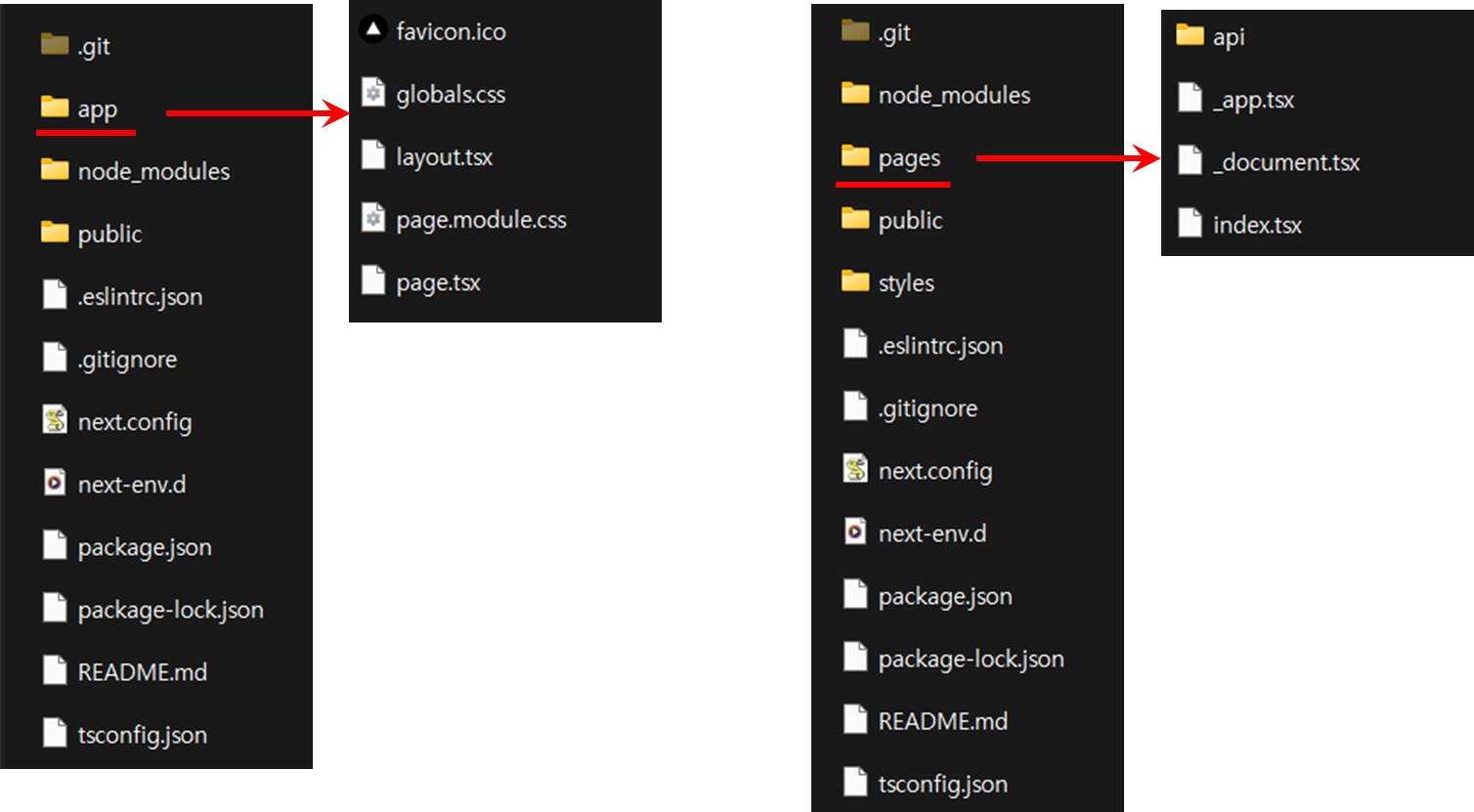
- Pages Router에서의 pages 및 styles directory의 역할을 app directory가 수행하고 있으며 layout.tsx, page.tsx 등 App Router file convention을 살펴볼 수 있다
3. 터미널에서 아래 명령어 입력하여 서버 실행 후 브라우저에서 localhost:3000 접속하여 정상동작 확인
npm run dev
# Basic structure of Next.js app
Top level folders
- app: App Router. 각 페이지는 이 폴더 내부에 위치함
- public: for static assets (images, fonts, etc)
app Routing Conventions
- layout: page 상단에 들어갈 component. route 및 maintain state 변경에 영향을 받지 않음. 페이지 간 공유해야 할 UI 구현에 사용.
- page: 메인 페이지 component
- loading: 로딩 UI. React Suspense
- not-found: 해당 페이지를 찾지 못할 때 띄워줄 UI. 404 not found.
- error: client component에서 에러 발생 시 띄워줄 UI. layout.tsx에서 발생하는 에러는 처리하지 못함
- global-error: layout.tsx에서의 에러 처리 용
- route: web request와 response API를 이용해 custom request handler를 만들 때 사용
- template: 동작은 layout과 비슷하나 매 child navigation마다 새로운 instance 생성
- default: Parallel route fallback page. 공식 문서 아직 없음
Other foleders and files in app directory
- api: 서버 기능 추가를 위한 폴더
- globals.css: 모든 페이지에 적용될 css 파일
- page.module.css: 특정 페이지에 적용될 css 파일
- favicon.ico: 해당 페이지의 favicon (사이트 이름 옆에 들어갈 이미지)
728x90
'Web development > Next.js Docs 파헤치기' 카테고리의 다른 글
| 2.3 Route Groups & Dynamic Route (0) | 2023.07.06 |
|---|---|
| 2.2 Linking and Navigating (0) | 2023.06.16 |
| 2.1 Pages and Layouts (0) | 2023.06.16 |
| 2.0 Routing (0) | 2023.06.16 |